Appearance
Email Management
The serverless.yml file doesn’t support creating a queue automatically. Therefore, the user will create the Queue SQS on AWS manually.
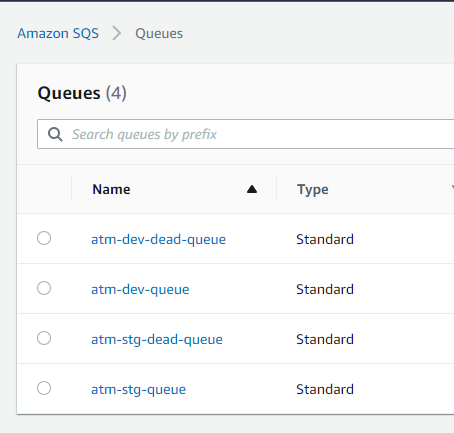
For example: the queue named ‘atm-stg-queue’ is created for using ‘atm-stg-dead-queue’. Next, the user selects atm-stg-queue and presses the Edit button to see the information below.
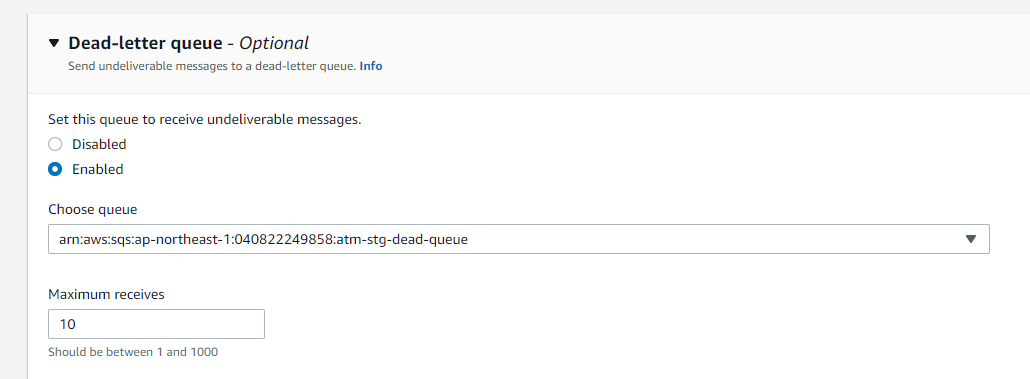
At Choose queue, select atm-stg-dead-queue’ and hit the Save button to confirm the changes.
After creating atm-stg-queue. The user is required to add Lambda triggers to config sending email jobs.

To use sendMail, configure the email service secret in AWS Secrets Manager for your stage (for example, a secret named atm-<stage>-email-service-secrets). Create the secret with the required keys for the email service (such as the client secret and project key).
Note: The Secrets Manager screenshot is intentionally omitted. Never publish secret names, ARNs, AWS account IDs, or credential values in documentation.